

Building the Greenville Development Explorer
See the Live Map →Snapshot
100%
Residential records masked
11
Permit systems unified
5
Upstate counties covered
One City's Feed, Then Ten More
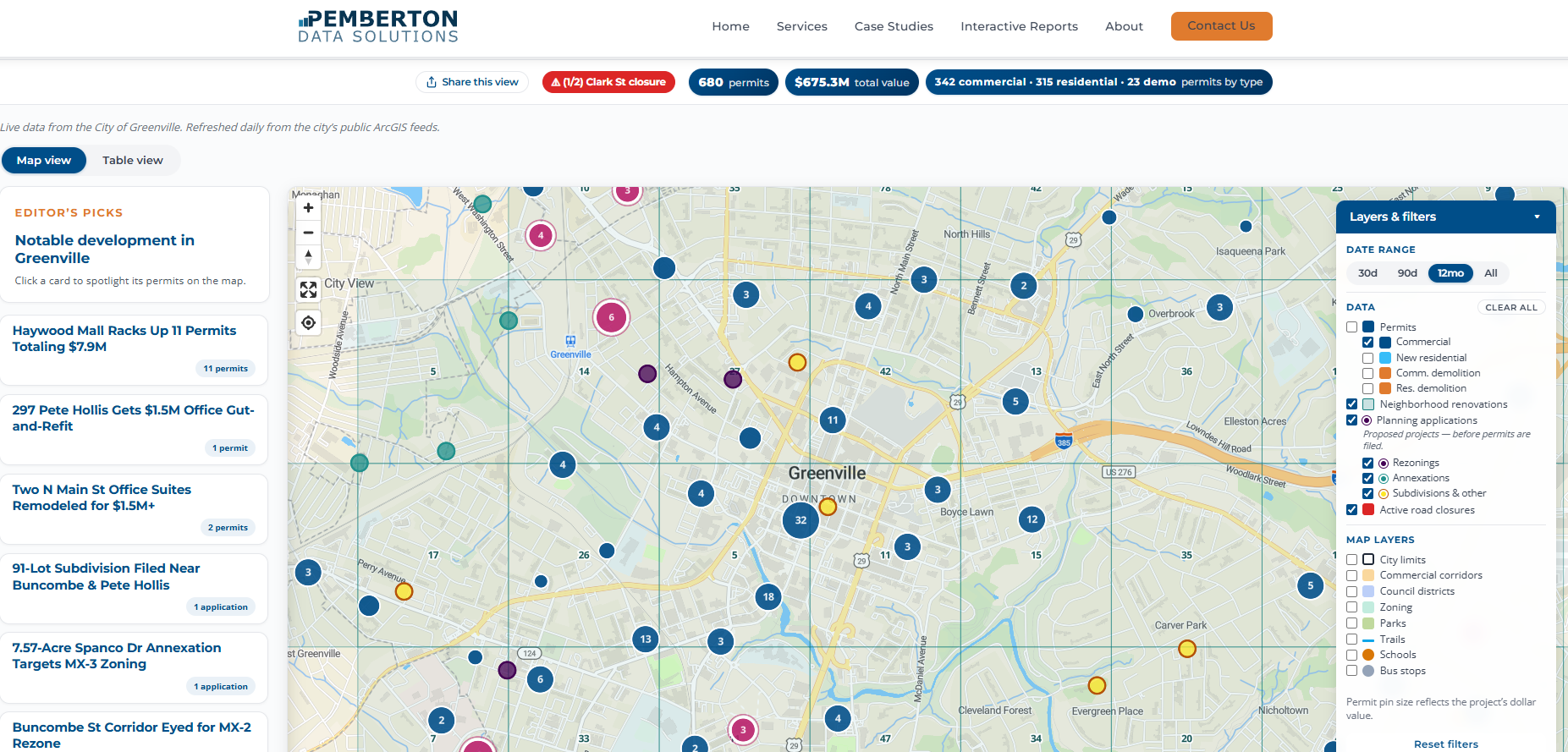
The Greenville Development Explorer started as a map of every building permit, planning application, and active road closure in the City of Greenville, built from the city's public ArcGIS feeds. Today the same pipeline ingests ten permit systems across five Upstate counties — Greenville, Spartanburg, Anderson, Pickens, and Oconee, cities and counties alike — and the map legend grows automatically as new jurisdictions come online. You can use it at pembertondata.com/map.
The original city endpoint is documented and records are updated regularly. On paper it's about as clean a public dataset as you find in municipal government. Two things surfaced as soon as we started working with it — and a third, bigger one surfaced the moment we tried to add a second jurisdiction.
The Data Arrived in the Wrong Coordinate System
Pins on a web map need regular latitude and longitude. The city's feed hands back coordinates in a different system, the kind surveyors use for land records. You have to tell the server to convert them before it sends the response.
A one-line fix, once you know it
Coordinates arrive in a surveyor's projection, not latitude/longitude. Adding outSR=4326 to the API request converts them server-side before the response is sent. The problem is nothing anywhere tells you that's the fix.
Everything in the Raw Feed Is Shouting
Everything in the raw feed is shouting. 100 MAIN ST. SMITH CONSTRUCTION LLC. Permit types are internal city codes like BLDC (commercial building) and DEMR (residential demolition). Statuses are two-letter codes like IS and CL. None of it means anything to a person looking at a map.
We built a cleanup layer that title-cases the text properly, without flattening things that should stay uppercase like LLC or NW, and translates every code into a human label. It runs once inside the pipeline, and the clean version is what everything downstream reads, from the database to the chart labels on the map.
Before: raw from ArcGIS
BLDC · IS · 100 N MAIN ST · x: 1555231.4, y: 987412.8
After: what the map reads
Commercial Building · Issued · 100 N Main St · 34.852°N, 82.395°W
Once the codes were labels, the same cleanup layer became the hook for the privacy logic below. We could tell a residential permit from a commercial one without parsing anything.
Every Jurisdiction Publishes Differently
The coordinate fix and the cleanup layer solved one city. Then we added Greenville County, and discovered the real problem: no two jurisdictions publish permits the same way.
One county exposes a documented ArcGIS endpoint. The next runs a permit portal that renders records in a search grid. Another publishes through a different portal product with its own login-free search, its own field names, and its own idea of what a "status" is. One county only releases data quarterly, by records request. The same permit concept — who, where, what, how much, when — arrives in ten different shapes, on ten different schedules.
One canonical schema, per-source adapters
Each jurisdiction gets its own ingestion adapter that speaks that system's dialect and runs on that system's natural cadence — daily where the source updates daily, monthly or quarterly where it doesn't. Everything lands in a single canonical schema in Azure SQL, so the map, the charts, and every downstream product read one consistent shape and never know where a record came from.
This is the part that makes the tool expandable. Adding a jurisdiction means writing one adapter and registering it — the map legend, the freshness panel, and the coverage lists across this site all update from the registry automatically. Nothing downstream is hand-edited when coverage grows.
We Chose Not to Republish Homeowner Data
This is the part that mattered most.
The permit data is public record. We're legally allowed to republish all of it, names and addresses included. Most permit viewers do exactly that. If you search around, you'll find tools that will show you which of your neighbors is renovating their kitchen and who their contractor is.
We made a deliberate choice not to do that.
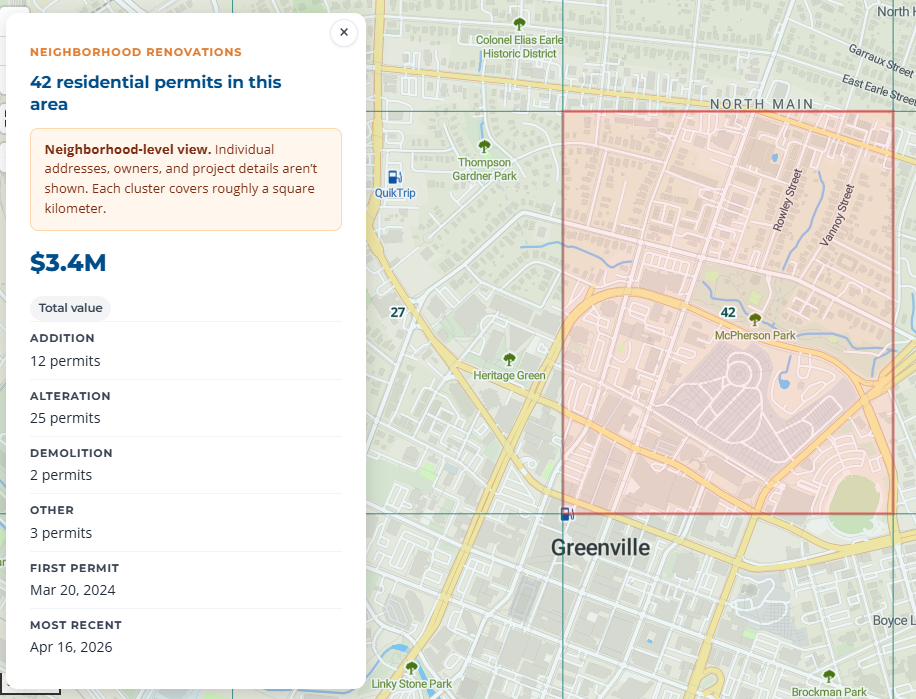
On our map, residential permits never show an individual address or an owner name. They're aggregated into grid cells roughly one square kilometer each, showing only totals: how many permits, what they were valued at, what categories they fell into. The exact location of any single renovation is not recoverable from what we publish.
Commercial permits show in full, because a commercial property and its owner are already part of everyday public life. New residential construction shows the location but strips the homeowner's name, because the project itself is visible from the street during construction.
Making this work required a classification layer inside the pipeline that separates residential from commercial permits and routes each class differently all the way through to the front end. The masked records never enter the web feed. There is no way for the browser to reveal them, because the data is never sent to the browser in the first place.
That rule travels with the pipeline. Every jurisdiction added since inherits the same classification and masking automatically, and the same line holds for the permit feeds built on this pipeline: individual homeowners are never published and never sold.
Two Rhythms, Thirty-Some Schedules
The original design had two triggers: a daily job for permits and planning data, and an hourly job for road closures, because someone driving across town shouldn't see a closure that cleared two hours ago. Those two rhythms are still the backbone — there are just far more schedules now, one per jurisdiction, each tuned to when its source actually updates.
Every scheduled job writes into the same canonical store in Azure SQL. A nightly export then publishes GeoJSON to Azure Blob Storage, and the map reads directly from blob — no backend, no database wake-up, no per-visitor query cost at read time. The hourly closure job skips the database entirely and writes straight to blob, so the serverless database stays asleep between daily runs instead of waking up every hour for a feed that has nothing to do with it.
30+
Scheduled pipeline jobs
Nightly
GeoJSON export to blob
Azure SQL
One canonical schema
Hourly
Closures, no DB wake
What It Became
The map loads. Pins where the permits are. Aggregate cells where the renovations are. A road closure is either there or it isn't. None of the shape of the underlying data — ten systems, ten dialects, thirty-some schedules — is visible to the person using the tool.
And because the hard part was the pipeline, not the map, the same clean data now feeds more than one thing. Over 90 published development stories started as permits in this feed. The Territory Feed — scored permit leads delivered monthly — is in production for paying subscribers. And beyond the Upstate map, the same pipeline now ingests permit systems across four states, from the Atlanta and Charlotte metros to the Triangle and the Lowcountry.